|
We
are curently reviewing the school's main site and
again I think each member could do a section that
interests them in their own way (within the design
guidelines agreed upon by the group.) Currently we
have decided that the background will be white and
that large coloured buttons will appear on the main
page and that the colours of the buttons will carry
over onto the pages they refer to. Lara has sent
the HEX codes for the colours below for use on the
site. We've decided that the site should be liquid
(tables defined by % not pixel size) and that there
will be no animations or JavaScript (except on the
main page menu) to make the page as speedy and
accessable as possible. We do have a problem in
that our current Server does not provide us with a
counter so we don't know what kind of clientele we
are designing for.
If you wish to nominate a section to do, please let
me know ASAP. You can start by looking at the
current site and downloading any information you
wish to keep and use as a model. Remember the Web
Publishing Guidelines. (See the submissions page of
that site.) Kit has volunteered to do the large gif
in the centre of the main page (see below thank you
Mr PhotoShop 5!) and Lara is making buttons based
on my concept drawing. I will most likely redo the
research area to start off with. Lara's colour
selection appears below. Benson might like to do a
more current E-Zine and no doubt Josh will hog all
the photos!
How
to use these codes: the
codes below echo the colours of the buttons for the
main page. I suggest using the lightest or most
subtle colour as a background table
then nesting a white table inside for the content
then making headings of white text on the darkest
colours. The code, for beginners is bgcolor="the
number"
you
need to define colours for tables
and
the
table cells called:<TD></TD>
(table
data). To see the results you need to have
something written in the cell or a picture
otherwise you won't see anything. (That's why I
wrote the names of the colours in the cells!) try
it out!
|
red
|
red
|
|
#FF0033
|
#CC0033
|
|
red
|
red
|
|
#630010
|
#B50024
|
|
green
|
green
|
|
#00FF00
|
#4AAD21
|
|
green
|
blue
|
|
#21D610
|
#00105A
|
|
blue
|
blue
|
|
#0000D6
|
#00809C
|
|
blue
|
turquoise
|
|
#1B25DB
|
#409069
|
|
aqua
|
aqua
|
|
#44D3D3
|
#80B594
|
|
green
|
yellow
|
|
#10846B
|
#FFDE00
|
|
yellow
|
yellow
|
|
#FFFF00
|
#E5EC6B
|
|
zinc
yellow
|
peacock
yellow
|
|
#ECE734
|
#DDEAA0
|
|
orange
|
orange
|
|
#FF3300
|
#FF6600
|
|
orange
|
brown
|
|
#CC3300
|
#CC6600
|
|
brown
|
brown
|
|
#EF5A10
|
#9C3910
|
|
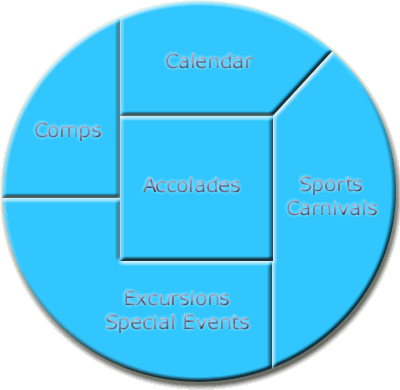
This
is the gif design proposed for the centre
gif on the main page, it will be
surrounded by buttons in the colour of the
spectrum designed by Lara. This gif was
produced by Kit and is shown here 50% of
its original size. When complete it will
be either metallic or have a jig-saw of
tinted gifs as its pieces. Kit seems to
have this aspect under control, now Josh
needs to come up with some
pictures!
|
|
|
|
|
|